Motion, on your terms
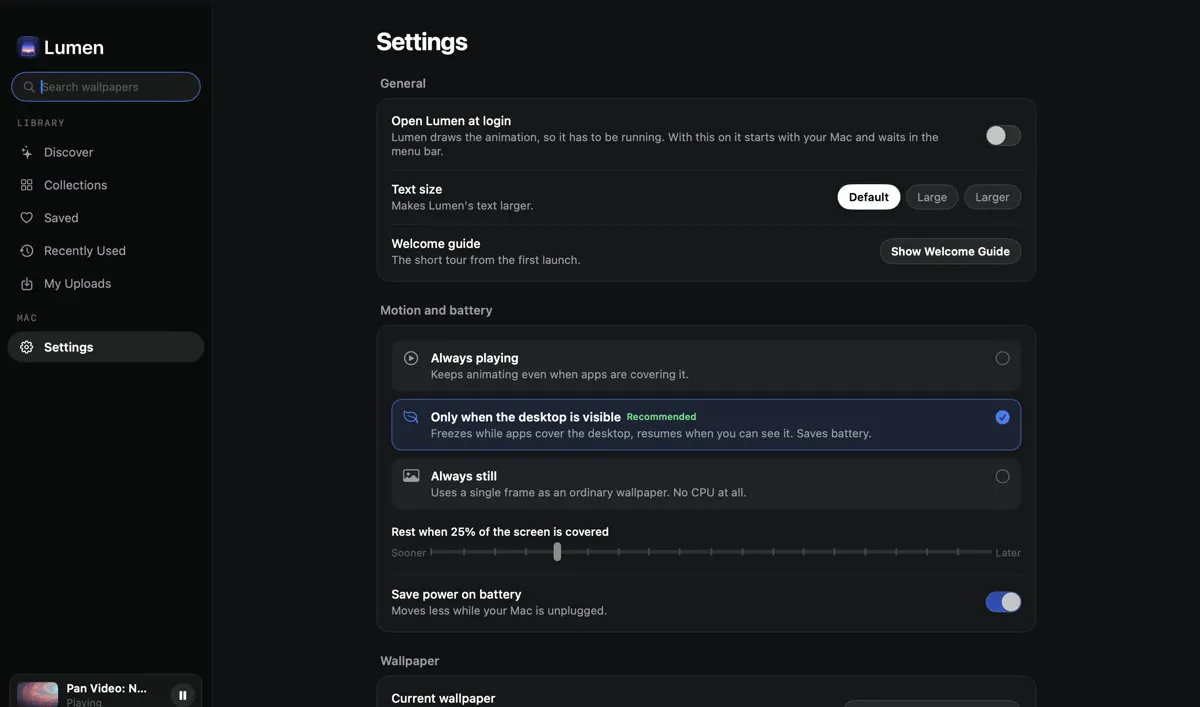
Choose Always playing, Only when the desktop is visible, or Always still. In Auto, a single slider decides how much of the screen your windows can cover before the wallpaper freezes, from the first window to nearly all of it.

4K Live wallpapers for macOS
Lumen turns your desktop into cinematic 4K footage: galaxies from Hubble and Webb, cities after dark, coastlines from the air. One click to apply, smart enough to pause while you work, and it never leaves your Mac.

Coming soon to the Mac App Store
Real screens from Lumen 1.4. No mockups.
Lumen is a native Mac app with one job: make the screen you look at all day feel alive, without ever getting between you and your work.
Choose Always playing, Only when the desktop is visible, or Always still. In Auto, a single slider decides how much of the screen your windows can cover before the wallpaper freezes, from the first window to nearly all of it.
The moment your apps cover the desktop, Lumen freezes on the current frame. Reveal the desktop and it picks up again, so you only pay for motion you can actually see.
181 clips across 14 collections, each one checked to be genuine 3840 by 2160 before it ships. No upscales, no filler.
Scrub through any clip and save the exact frame you love. That frame is what you see whenever motion is off.
Drop in any MP4 or MOV and it becomes a wallpaper with the same controls. It stays on your Mac. There is no server to upload it to.
Let your wallpaper change itself every 15 minutes, every hour or once a day, from the wallpapers you have applied or the whole library.
Unplug and Lumen holds a still frame of your wallpaper on its own. Plug back in and the motion returns.
One click covers every connected screen, and Lumen keeps your wallpaper in place as you move between Spaces.
Switch motion modes, skip to the next wallpaper or pause from the menu bar. Close the window and Lumen keeps working quietly.
Previews stream as you browse, and a full clip downloads only when you choose it. The app itself stays tiny.
Lumen copies your current wallpaper before it changes anything. Restore My Wallpaper puts it back, exactly as it was.
Every image below is lifted straight from the wallpaper it names. Not a render, not a mockup. Hover or tap to see it move.
Browse by mood, from deep space to quiet forests, and find the right wallpaper for the work in front of you.
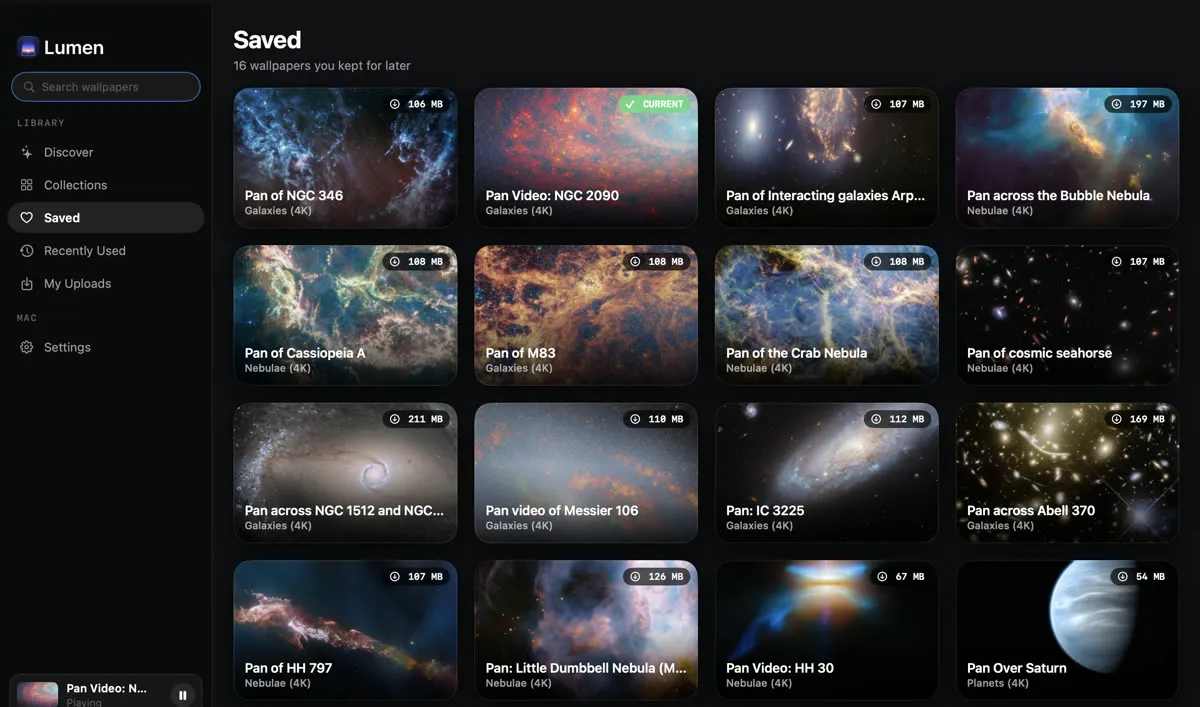
All footage is open-licensed, from ESA/Hubble, ESA/Webb, Mixkit and Pixabay, and each wallpaper carries its credit inside the app (see every credit). Nothing is bundled and nothing downloads until you choose it.
Lumen was built so there is nothing to collect in the first place.
No sign-up, no login, no email address. Ever.
No analytics, no telemetry, no ads and no cookies, in the app or on this site.
Videos you add never leave your Mac. There is no Lumen server to send them to.
The app only contacts the footage servers of ESA/Hubble, ESA/Webb, Mixkit and Pixabay.
The details, in plain language: read the privacy policy.
Yes. Lumen is free to download and free to use, with every feature included. There are no ads, no account and no in-app purchases.
No. There is nothing to sign up for, nothing to log in to and no licence server to check in with. You open Lumen and pick a wallpaper.
Any Mac running macOS 14 Sonoma or later. Lumen is a Universal app, so it runs natively on both Apple silicon and Intel Macs, and it works across every connected display.
A moving full-screen video always costs something, and Lumen is honest about that by putting you in control. In Auto mode it freezes the moment your windows cover the desktop and resumes when you can see it again. On battery it holds a still frame. And Always still mode shows a single frame, like an ordinary wallpaper, for no ongoing cost at all.
For a moving desktop, yes: something has to draw it, because macOS treats the desktop picture as a still image. Lumen does not need its window open, though. Close it and Lumen carries on quietly from the menu bar, and Launch at Login brings it back after a restart.
Yes. Add any MP4 or MOV from My Uploads and it becomes a wallpaper, with the same motion controls and still-frame picker as the built-in library. Your videos stay on your Mac and are never uploaded anywhere.
Every clip is open-licensed footage: deep-space imagery from ESA/Hubble and ESA/Webb under CC BY 4.0, and cinematic stock footage from Mixkit and Pixabay under their own free licences. Each wallpaper shows its credit inside the app, and every credit is listed on the footage credits page.
No. Lumen has no analytics, no telemetry, no advertising and no account. The only servers it ever talks to are the four footage servers, to preview and download the clips you browse. The privacy policy lists them by name.
Before Lumen changes anything, it makes a copy of your current wallpaper. Restore My Wallpaper, in Settings, puts it back exactly as it was.
Something else? Visit Support or write to advait8989@gmail.com.
181 cinematic 4K wallpapers, motion that knows when to stop, and nothing that ever leaves your Mac.
Coming soon to the Mac App Store